Nuwarra
  • Home
  • Early Stage 1
    • Library Routines ES1
    • Caring for Books ES1
    • Fairy Tales ES1
    • Nursery Rhymes ES1
    • Parts of the computer
    • Mouse Practice
    • Keyboarding
    • Fun Learning
    • Sight Words
  • Stage 1
    • Library Routines Odd year
    • Library Routines Even year
    • Typing Stage 1
    • Odd Years Stage 1
    • Even Years Stage 1
  • Stage 2 2025
    • Library Expectations S2
    • Typing Stage 2
    • Odd Years Stage 2
    • Even Years Stage 2
  • Stage 3 2025
    • Typing Stage 3
    • Let's Play Jeopardy!
    • Odd Years Stage 3
    • Even Years Stage 3
  • Links
  • Bookweek All Year
    • Bookweek 2025
    • Bookweek 2024
    • Dewey
  • Past Years
    • My Community - Moorebank
    • Stage 1 2017 >
      • Community Workers 1
    • Stage 2 2017 >
      • Getting Around Our Community
      • Drawing
      • Art with Word
    • Stage 3 2017 >
      • Data Structure
      • Research for a Database
      • Make a Database
      • Presentation - Form
      • Parts of a Computer
    • Stage 1 2016 >
      • Desert Life
      • Sound Waves & Musical Instruments
      • Sound Waves
      • Buggy 4 Bugs 1
      • Buggy 4 Bugs 2
      • Buggy 4 Bugs 3
      • My Birth
      • When I was 7
      • Zoo Map
      • School Sports Day Timetable
      • The School Bus
      • Frog in the Pond
      • Funny Rhymes
    • Stage 2 2016 >
      • Problem Solving and Presention 1
      • Problem Solving and Presention 2 >
        • Kidpix Rubric -grade yourself
        • Powerpoint Rubric -grade yourself
    • Stage 3 2016
    • Stage 1 2015 >
      • Communities >
        • I Can... 1
      • Community Workers 1 >
        • I Can... 2
      • Trains 1 >
        • I Can... 4
      • Become a Keyboard Wizard
    • Stage 2 2015 >
      • Getting Around Our Community
      • Art with Word
      • Searching - a beginning >
        • Searching - Let's start!
        • Searching - Best Page???
        • Searching - a Scavenger Hunt
      • Spreadsheet Wizardry Terminology >
        • Spreadsheet Wizardry Challenge
        • Spreadsheet Wizardry Formulae
        • Spreadsheet Wizardry Making Graphs
        • Spreadsheet Wizardry Reading Graphs
    • Stage 3 2015 >
      • Research for a Database
      • Make a Database
      • Presentation - Form
      • Using a Database
      • Internet (Skill Assessment 4) >
        • Digital Life 1
        • Searching
        • Searching 2
        • Searching 3
        • Searching 4
        • Searching - Best Page???
        • Searching 5 >
          • Internet (Skill Assessment 4a)
      • Spreadsheets (Skills Assessment 5) >
        • Spreadsheets 1 Terminology
        • Spreadsheets 2 Formulae
        • Spreadsheets 3 Making Graphs
        • Spreadsheets 4 Other Uses
        • Spreadsheets 5 Investigating Graphs
    • Stage 1 2014 >
      • Copy and Paste Practice
      • Living and Non-Living Things
      • Days of the Week
      • Seasons
      • Celebrations
      • Sound Waves old
      • Sound Waves & Musical Instruments old
      • Searching
    • Stage 2 2014 >
      • Inventions Timeline
      • Building Flow Charts old
    • Stage 3 2014 >
      • Graphics & Vocab. (Skills Assessment 1) >
        • Typically Aussie???old
        • Let's Animate old
        • Skills Assessment 1a (graphics & Vocab)
      • Fact or Opinion S3 old
    • Stage 1 2013 >
      • Little Red - a fairytale >
        • Comparing Stories
        • Beginning? Middle? End?
    • Stage 2 2013 >
      • Lost >
        • Ramp and Screws
        • Knock Knock
        • Start Your Engine
        • Who is Stronger?
        • Measuring a Force
        • Can't Move Me!
        • Leave it to Levers
        • Gearing Up
        • Lost Assessment 1
        • Lost Assessment 2
      • Human Body >
        • Did you Know?
        • How to Make a Table
        • Populating the Table
        • Quick Quiz
  • Movies
  • Powerpoint 1 Rebus Nursery Rhymes
  • Cyber Safety S1
  • Digital Citizenship S2
  • Digital Citizenship S3
  • Digital Citizenship S1
  • Digital Citizenship text
  • Logic Puzzles
  • Logic Puzzles 3-6
  • ICT in Everyday Life
  • Fact and Opinion S3
    • Fact or Opinion - Advertising
  • PowerPoint Animation
  • Halloween Spreadsheet
Database
Data is information - facts and statistics - collected together for reference or analysis. 
A database is an organised collection of data. Look at the icons in the banner. Each icon is a database some of which you have used or heard about. You may have made your own database - 
  • a birthday book, arranged by date, so you can look up and remember the birthdays of friends and family.
  • an address book arranged by surname.
or used 
  • a Yellow Pages phone directory, arranged by profession, to find e.g. a gardener, baker, plumber...
  • a White Pages phone directory, arranged by surname, to find an address or phone number

You will hear the term DBMS. It means database management system. DBMS create databases to manage information. We will be using one called Microsoft Access.
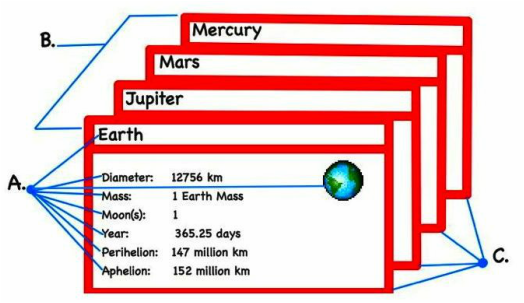
PictureKey: A. = Field; B. = File; C. = Record
Database Terminology

A character is the smallest unit of data and include letters, numbers and special symbols.
A field (A.) is a single item of information. The information can be numerical (e.g. 12756 km), text (e.g. the name 'Earth') or graphical (e.g. the picture of the Earth).
A record (C.) is a collection of fields. Records are usually sorted in some way (e.g. alphabetically, numerically or by date).
A file (B.) is a collection of records, usually on a common topic.


    Quick Quiz 1


    Hint: It is the meaning of the word data.
Submit
Data Types
Fields can contain almost any sort of information,from a telephone number to a street address,photograph or written description (text). The most common data types are:
  • Text:              for mixtures of words, numbers and symbols (e.g. names and addresses).
  • Number:         for numbers only (e.g. weight, distance, serial numbers).
  • Date / time:  for calendar dates and time (e.g. birth dates, lap times).
  • Currency:       for money values (e.g. cost of products, bank balances).
  • Graphical:     for pictures, diagrams or photos (e.g. identity pictures, supermarket product photos).

    Quick Quiz 2


    Use this specimen Australian passport to answer the next 4 questions.
    Picture

    This record is out of a database storing information about the moons in our solar system. Use it to answer the next 5 questions.
    Picture
Submit
Differences between Databases and Spreadsheets


  1. A spreadsheet is an application for tabulating data while a database is where data is stored so that it can be retrieved by users.
  2. The amount of data that is usually stored in a database is way more than what is contained in a spreadsheet.
  3. A spreadsheet is edited directly by people while a database is accessed by applications that enter and modify data.
  4. A spreadsheet is usually used for presentations and paperworks often involving number crunching while databases are commonly used in cases where a lot of data needs to stored.

Powered by Create your own unique website with customizable templates.